


Blip AI Review 2026: The Best Voice-to-Text Tool for Productivity?
Blip AI Review: Is This the Ultimate Voice-to-Text Shortcut for 2026? 🚀
Hey, this is Golam, and welcome to my Blip AI Review.
No matter how impressive your typing speed is, replying to every message is slowing you down. Blip AI Review is the focus today because this tool claims to turn your speech into clean, formatted text for any app the moment you press a hotkey. In a world where we are constantly toggling between Slack, Gmail, and ChatGPT, the ability to dictate thoughts without "umms" and "uhhs" is a massive productivity boost.
I have spent significant time testing dictation software, and most of them feel clunky or restricted to specific windows. Blip AI promises to break those barriers. Whether you are a developer coding in VS Code or a marketer drafting a LinkedIn post, this tool aims to be your silent, invisible typist. Let’s dive deep into whether this tool lives up to the hype and if it’s the right investment for your workflow.
What is Blip AI? 🤔
Blip AI is a professional-grade voice dictation and "Action Mode" tool designed to help users type up to 4x faster. It isn't just a basic speech-to-text converter; it is an intelligent layer that sits on top of your operating system (Mac, Windows, or Android).
By pressing a global hotkey, you can speak naturally into any text field. The AI then processes your voice, removes filler words, fixes punctuation, and pastes the polished text directly where your cursor is blinking. It’s built for professionals who want to communicate as their best selves without the physical fatigue of typing.
Creator Overview 👤
Blip AI was founded on October 10, 2025, by Ayush Bansal and his team based in Bilaspur, Haryana, India. The team is currently in a "Growth" phase and remains bootstrapped, which often means they are highly responsive to user feedback and community needs.
Ayush and the co-founder, Divyansh, are active in their Discord community, frequently pushing updates for their Mac, Windows, and Android versions. Their goal was simple: solve the frustration of juggling keyboards and small text boxes by creating a "hands-free productivity magic" tool.
How It Works ⚙️
Using Blip AI is remarkably straightforward. Here is the step-by-step process of how it integrates into your daily life:
Installation: You install the app on your Mac, Windows, or Android device.
The Hotkey: You set a global hotkey (like the 'Fn' key).
Dictation: Whenever you are in a text field (Gmail, Slack, or even a code editor), you hold the hotkey and speak.
AI Polishing: As you speak, the AI listens in real-time. Once you release the key, it strips out "um" and "uh," fixes your grammar, and structures the sentences.
Action Mode: If you say "Hey Blip," you can give commands. For example: "Hey Blip, draft a follow-up email to Sarah thanking her for the meeting." The AI then generates the entire email based on your command.
Key Features & Benefits ✨
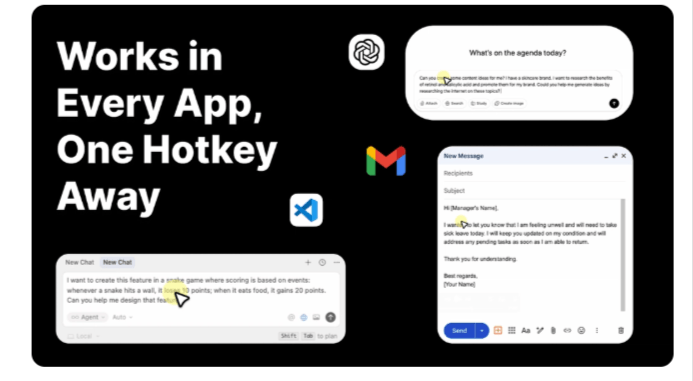
Global Hotkey Integration: It works everywhere. You aren't stuck inside a specific app; if you can type there, Blip can talk there.
Filler Word Removal: It automatically cleans up your speech. It turns "Um, let's meet at, uh, 5 PM?" into "Let's meet at 5 PM."
Action Mode: This is the standout feature. It allows for "context-aware" writing, meaning you can dictate instructions rather than just words.
99+ Languages Supported: Whether you speak English, Spanish, or Italian, Blip handles it. It even offers auto-detection.
Scratch Pad: A dedicated space to capture quick thoughts and polish them later without switching windows.
Custom Vocabulary: You can add industry-specific jargon, names, or acronyms to ensure the AI never misspells your technical terms.
Cross-Platform Sync: Sync your transcripts and notes between your Android phone and your desktop dashboard.
Who Should Use This Product? ✅
Content Creators: Perfect for "writing" first drafts of blog posts or scripts while walking or relaxing.
Software Developers: Great for documenting code or using voice commands in VS Code and Cursor.
Marketers & Busy Professionals: If your day is 90% Slack and Email, this will save you hours of typing.
Non-Native Speakers: The AI polishing helps turn spoken thoughts into professional, grammatically correct English (or other languages).
Who Should Not Use This Product? ❌
Offline Workers: Currently, Blip AI requires an internet connection to reach the speech services and LLMs.
Privacy Purists: While the tool is secure, if you are legally forbidden from using cloud-based AI for data processing, you might need to wait for a local LLM version.
Users with Noisy Environments: Like all dictation tools, extreme background noise can sometimes interfere with accuracy.
Pricing & Plans 💰
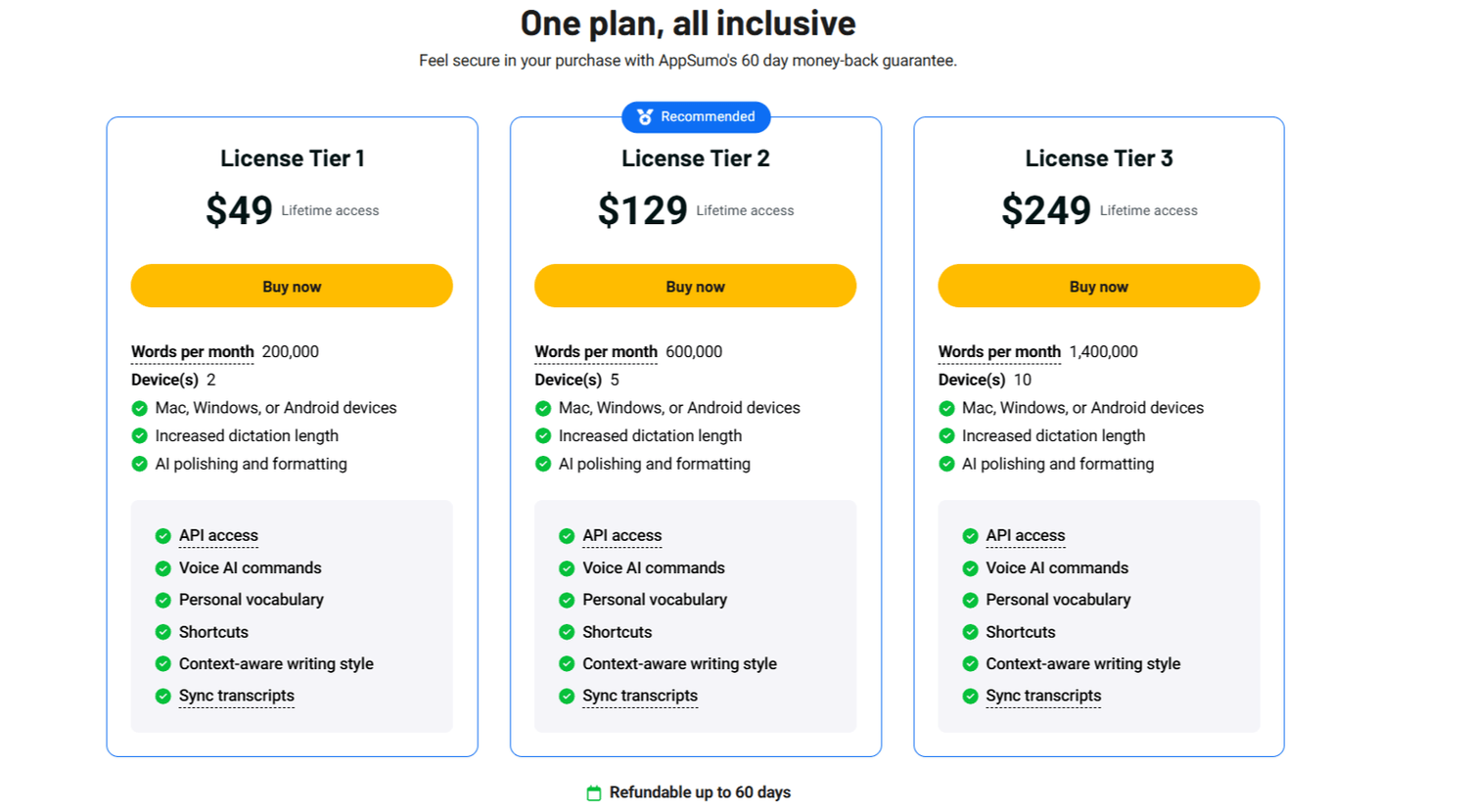
Blip AI is currently offered as a Lifetime Deal on AppSumo, which is a massive steal compared to monthly subscriptions.
Bonus
60-day money-back guarantee
Lifetime updates
👉 This makes it a low-risk investment.
Pros and Cons 📊
Pros:
Incredible Speed: Transcription is nearly instant and very accurate.
User Experience: The "Hey Blip" feature makes it feel like a true assistant.
Active Development: The founders are constantly adding features like Android overlays and team accounts.
Smart Formatting: It understands where to put periods and capital letters automatically.
Cons:
Device Limits: Tier 1 only allows 2 devices, which might be tight for power users with a laptop, desktop, and phone.
UI Size: Some users find the "listening bar" a bit large, though the team is working on a smaller version.
VPN Issues: Some users reported connectivity issues when a VPN is active.
Final Verdict 🏆
If you find yourself exhausted by the end of the day from typing, Blip AI is a no-brainer. It is much faster than traditional typing and significantly smarter than the built-in dictation tools on Mac or Windows. The Action Mode alone justifies the price, as it moves the tool from "transcription" to "creation." With a 4.9-star rating and a responsive dev team, it is one of the most promising productivity tools of 2026.
Questions & Answers 🙋♂️
Q: Can I use Blip AI on my iPad? A: Yes! There is a test pilot version available for iPad users via their Discord community.
Q: Does it work with specific apps like VS Code or Slack? A: It works in any app where you can place a cursor and type. It is a global system tool.
Q: Is there a way to use it offline? A: Currently, no. It requires an internet connection, but an offline mode with local LLMs is on the future roadmap.
Q: Can I turn off the AI polishing? A: Yes, if you want your raw speech without any corrections, you can disable the AI polishing in the settings.
Ready to stop typing and start speaking? 🎤
Don't let slow typing hold back your best ideas. Grab the lifetime deal today and transform your workflow!




Begin Your Journey Toward Launching A
Successful Online Business Today!


All Rights Reserved © 2026 | FOA Marketing ®